Water Meter OCR: Reading a Meter From a Photo
By Ilya Makarov · Updated 2026-10-14

Before you photograph anything, check whether you need to. A large share of US and UK water meters are now read remotely — a radio module on the lid reports the register without anyone opening the pit. If your bill says “actual” rather than “estimated” every month, your utility already has the number, and nothing you submit will change it.
The reasons to read it yourself are the ones the utility cannot do for you: checking a bill that looks wrong, tracking your own use week to week, or hunting a leak. All three depend on reading the register correctly, and water meters make that harder than electricity meters do.
What is on the face
Most residential meters carry four things, and only one of them is your reading.
| Part of the register | What it means | Do you report it |
|---|---|---|
| Odometer digits, black or white | Whole units consumed since installation | Yes, left to right, leading zeros included |
| Digits on a red background | Fractions of a unit — tenths, hundredths | No |
| Large sweep hand | Position within the current unit | No |
| Small triangle, star or snowflake | Low-flow indicator | No — it is a diagnostic, not a reading |
The unit is printed on the face, and it is not the same everywhere. US meters are usually marked CU FT or US GAL; UK and European meters read m³. Check it once, because the difference is enormous. A cubic foot is 7.48 gallons, and utilities that bill in CCF — one hundred cubic feet — are charging you per 748 gallons. Misreading a CCF meter by a single digit is a 748-gallon error on the bill.
On a cubic-foot meter, one full revolution of the sweep hand equals one cubic foot. That is the same 7.48 gallons, which makes the sweep hand a surprisingly good way to time a fixture: fill a bucket, watch how far the hand travels.
The leak test
This is the most useful thing a water meter does, and it takes two minutes.
Turn off every tap, appliance, irrigation zone and ice maker in the house. Then watch the small triangle, star or snowflake dial. It is geared to respond to very low flow — much lower than the odometer will show in any reasonable time. If it turns at all with everything shut, water is moving somewhere it should not be. The faster it turns, the bigger the leak.
A slowly turning leak indicator with a still odometer usually means a toilet flapper. A visibly spinning one means something larger, and it is worth shutting the main and checking whether it stops, which tells you whether the leak is inside the house or between the meter and the wall.
Why water meter OCR fails more often than you expect
The photo you can actually take of a water meter is a bad photo, and no recogniser fixes that afterwards. The specific problems:
- The meter is in a pit. You are shooting down a hole, in your own shadow, holding a lid up with one hand.
- Condensation. Meters live in damp ground and the glass fogs from the inside, where you cannot wipe it. Some registers have a small desiccant that stops working after a decade.
- Mixed digit colours. Black digits and red-background digits sit in the same row. A recogniser reads the whole strip and hands you a number that includes the fractions, which is off by a factor of ten, a hundred or a thousand, depending on how many red digits the register carries.
- Odometer wheels mid-roll. The rightmost whole-unit wheel is often caught between two digits, showing the bottom of one and the top of the next. The correct answer is the lower digit; recognition guesses.
- Dirt and silt. The register in an outdoor pit accumulates a film that no amount of image processing recovers.
Our own test on 14 October 2026 shows it on a sample register (black drums 04823, red drums 17). Swiping over the black drums only, the app returned 04823. The browser tool read the whole strip and returned 0482307: the red litres were included, and one of them was misread.
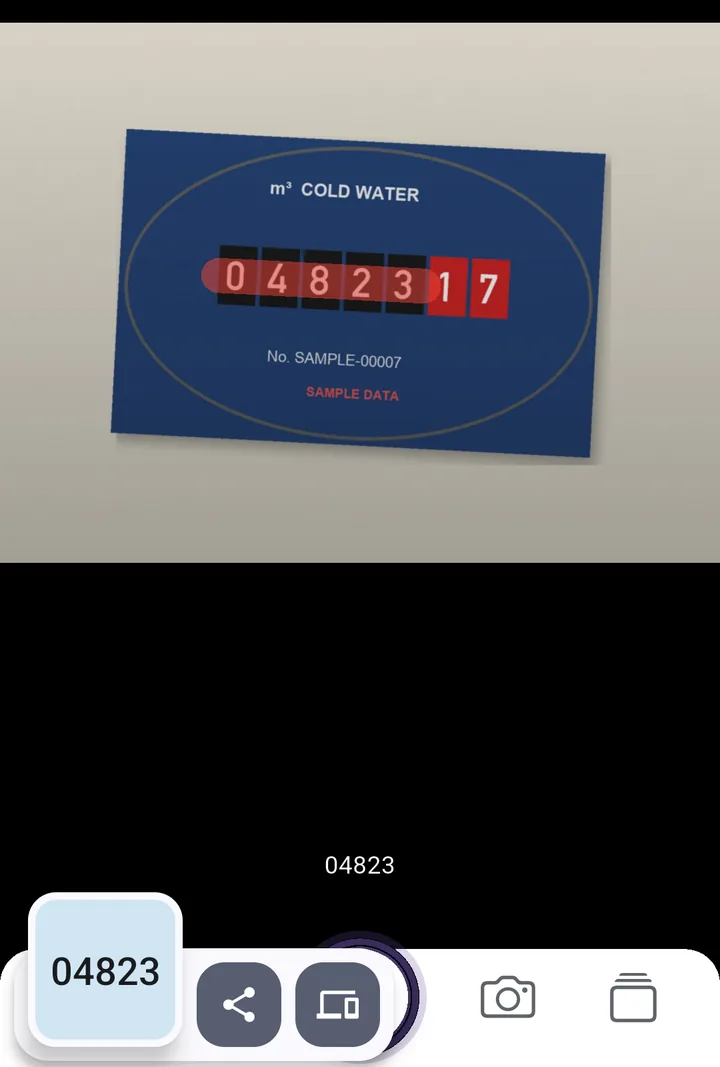
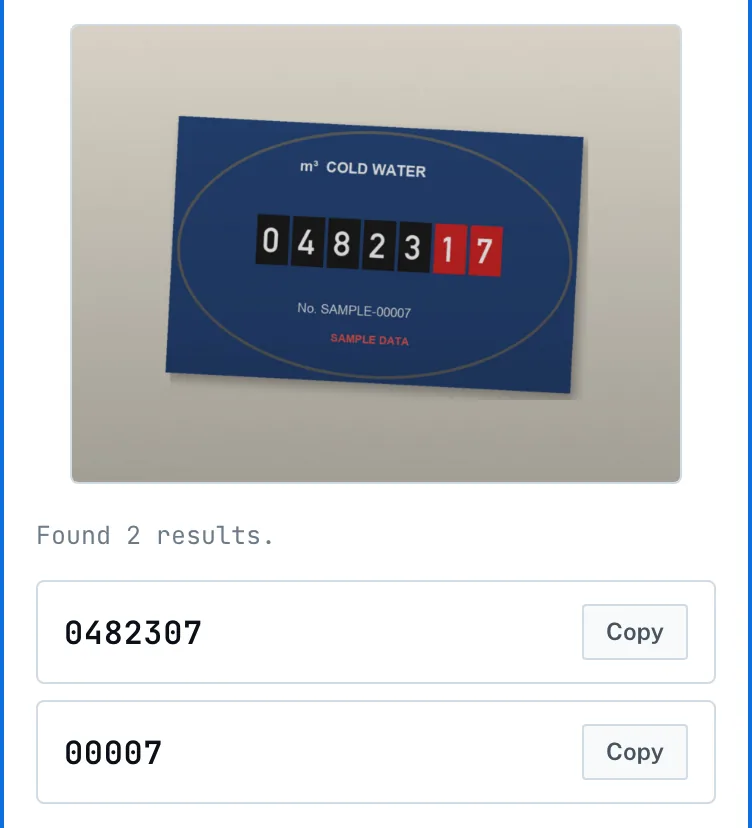
The mixed-colour problem is the one worth planning around, because it produces a wrong answer rather than a failed read. The general failure modes behind the rest are covered in why OCR gets numbers wrong.
Taking a photo that can be read
Wipe the glass and the pit lip first. Get square to the face rather than shooting at an angle down the hole — an angled register skews the digits and pushes the outer ones out of focus. Use a torch held to one side rather than the phone’s flash, which bounces straight back off the glass into the lens. Fill the frame with the odometer strip and crop out the sweep hand entirely; if the red digits are not in the picture, nothing can mistakenly include them.
Then check the result. Our meter reading tool shows the digits it read next to your photo, so you compare rather than trust. It cannot see colour: if the red litre wheels are in the frame, they will be in the result, so keep only as many digits from the left as there are black wheels. The single best control is your previous reading: meters count up only, so a number lower than last month is a misread, and one implausibly higher usually means an extra digit crept in from the red section.
For a meter you read every month in a dark pit, two things save the trip back outside when a number looks wrong: shooting straight from the camera, and having last month’s reading on the phone to compare against. SwipeScan does both — you swipe over the black wheels only, and the paid history keeps the previous reads. For an occasional reading the meter reading tool handles it in a few seconds.
If you want to see consumption as a trend rather than a list, getting the numbers into a spreadsheet covers the formatting traps. The same photo discipline applies to reading an electric meter, which has its own colour-coded digits to leave out.
Frequently asked questions
What is the small triangle on my water meter?
The low-flow or leak indicator. It turns whenever any water is moving through the meter. Shut off every tap and appliance and watch it for two minutes — if it still moves, water is escaping somewhere.
How many gallons is one CCF?
748. CCF means one hundred cubic feet, and a cubic foot is 7.48 gallons. Many US utilities bill per CCF, so one digit on your meter can represent 748 gallons of water.
Try the tool this guide is about
It runs in your browser — nothing uploaded, no account. The app adds the camera, offline use, and a paid scan history.
Related guides
How to Read My Electric Meter From a Photo
How to read my electric meter correctly from a photo: which digits count, why red numbers are ignored, dial meters, Economy 7 rows, and where OCR trips up.
OCR Accuracy: Why Numbers Come Out Wrong
OCR accuracy is quoted per character, which hides the real problem. On a long number the whole string is what matters, and that falls away fast. Here is the maths.
Image to Excel: the Traps in Data From Picture
Image to Excel works well until a long number appears. Excel's Data from Picture, the 15-digit ceiling, lost leading zeros, and how to avoid each of them.