How to Find an IMEI Number Without the Box
By Ilya Makarov · Updated 2026-10-14

If the phone turns on, this takes four seconds. Open the dialler and type *#06#. You do not need to press call — the IMEI appears as soon as the last character is entered.
That code is not a carrier feature or an Android thing. It is a supplementary service code handled by the handset itself, which is why it works with no SIM inserted, no service, and no data connection. It works on feature phones, on cellular tablets, and on phones with a locked screen where the emergency dialler is reachable. Try this before anything else.
Everything below is for the cases where you cannot, because the phone is dead, lost, sold, or in a drawer with a flat battery.
Where the number is physically printed
| Device | Where to look |
|---|---|
| iPhone 6 through 13, and non-US iPhone 14 onward | Etched on the SIM tray, in very small type |
| iPhone 5, 5c, 5s, SE (1st generation) | Engraved on the back of the case |
| US iPhone 14 and later (eSIM only) | No tray — Settings, or your Apple Account device list |
| Android with a removable battery | Sticker in the battery compartment |
| Modern Android | Settings → About phone → IMEI or Status |
| Any phone | Barcode label on the box, the carrier contract, the original receipt |
Two software routes survive a dead phone. If the iPhone was signed into your Apple Account, the device list at appleid.apple.com still shows its IMEI. If you ever synced it to a computer, Finder or iTunes shows the same, and clicking the serial number in the device summary cycles through the other identifiers including the IMEI.
The SIM tray is the most common answer and the most annoying one. The digits are laser-etched into brushed metal a couple of millimetres tall, with almost no contrast — the same colour as the surface they are cut into.
What the 15 digits mean
An IMEI is always 15 digits, and it is not arbitrary:
- Digits 1–8 are the Type Allocation Code, which identifies the model. Every phone of the same model shares this prefix.
- Digits 9–14 are the unit serial number assigned by the manufacturer.
- Digit 15 is a check digit, calculated from the first fourteen with the Luhn formula.
That last digit is the useful one, and it is the reason IMEI is more forgiving than most numbers you might read off a photo. Luhn catches every single-digit error — change any one digit and the checksum fails. It also catches almost every transposition of adjacent digits, with one known exception: swapping 0 and 9 next to each other passes. So a valid checksum is strong evidence you read it correctly, and a failed checksum is proof you did not.
Worth knowing so it does not confuse you: an IMEISV is 16 digits, not 15. It is the first fourteen digits of the IMEI plus two digits of software version, and it has no check digit at all. If a diagnostic screen shows you sixteen digits, you are looking at the IMEISV.
Because digits 1–8 identify the model, you also get a cross-check for free. Two phones of the same model must share their first eight digits — useful when you are working through several handsets and want to know whether a reading belongs to the device in your hand.
Reading it off a photo
The SIM tray case is genuinely difficult, and it is worth being clear about why rather than blaming the software. The characters are around one millimetre tall, they are the same colour as the metal, and the surface is reflective, so lighting the digits also lights everything around them. Below roughly ten pixels of character height, no recogniser does well; general-purpose OCR expects text at something like 300 dpi.
The fix is physical rather than digital. Get the phone’s camera as close as it will focus — most modern phones will hold focus at a few centimetres. Light the tray from a low, oblique angle with a torch rather than the flash, so the etched grooves cast small shadows and the digits gain contrast they do not have on their own. Rest both the tray and the camera on something solid. A stack of three exposures at slightly different angles will usually contain one readable frame.
Then verify. Our IMEI from photo tool runs the Luhn check on what it read and tells you whether the checksum passes, which turns “probably right” into a yes or no answer. That check is the whole point — the common misreads are exactly the confusions described in why OCR gets numbers wrong, and Luhn catches any one of them on its own. Two misreads in the same number can occasionally cancel out, so a pass on a very poor photo is still worth a glance.
For an etched tray specifically, capturing live — close in, torch off to one side, several frames — beats uploading a hasty snapshot, which is where SwipeScan is worth the install. The app reads and copies the digits but does not run the Luhn check; paste the result into the tool here if you want it verified. For a screenshot of a settings page you already have on disk, the IMEI from photo tool in a browser is quicker.
What we saw on box labels
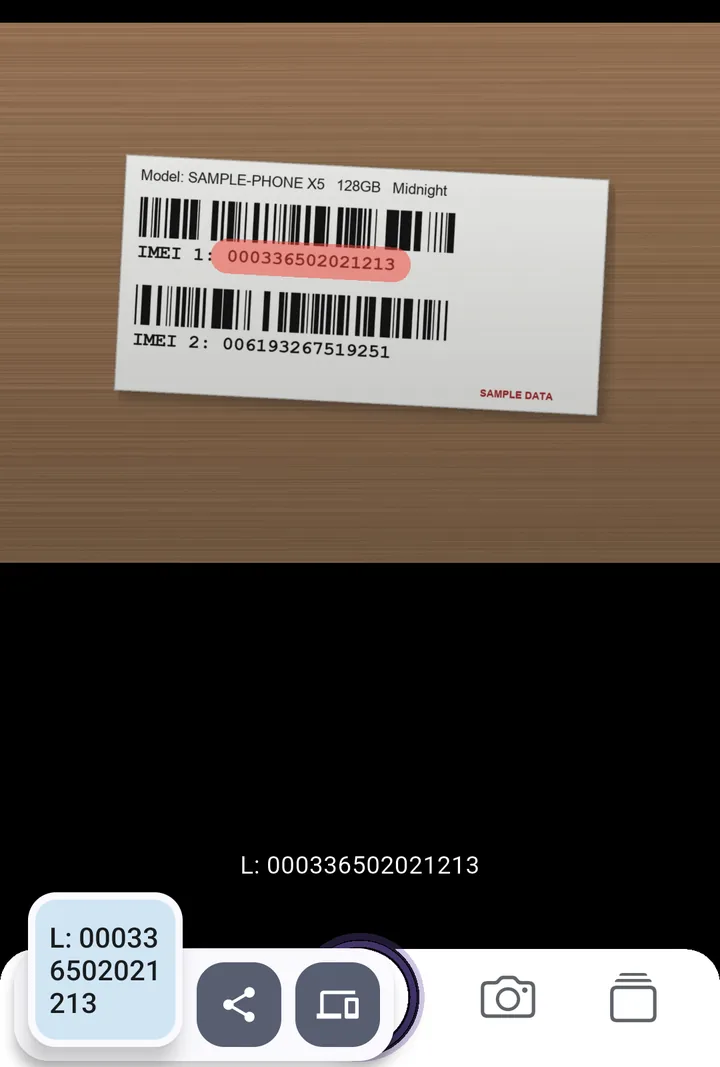
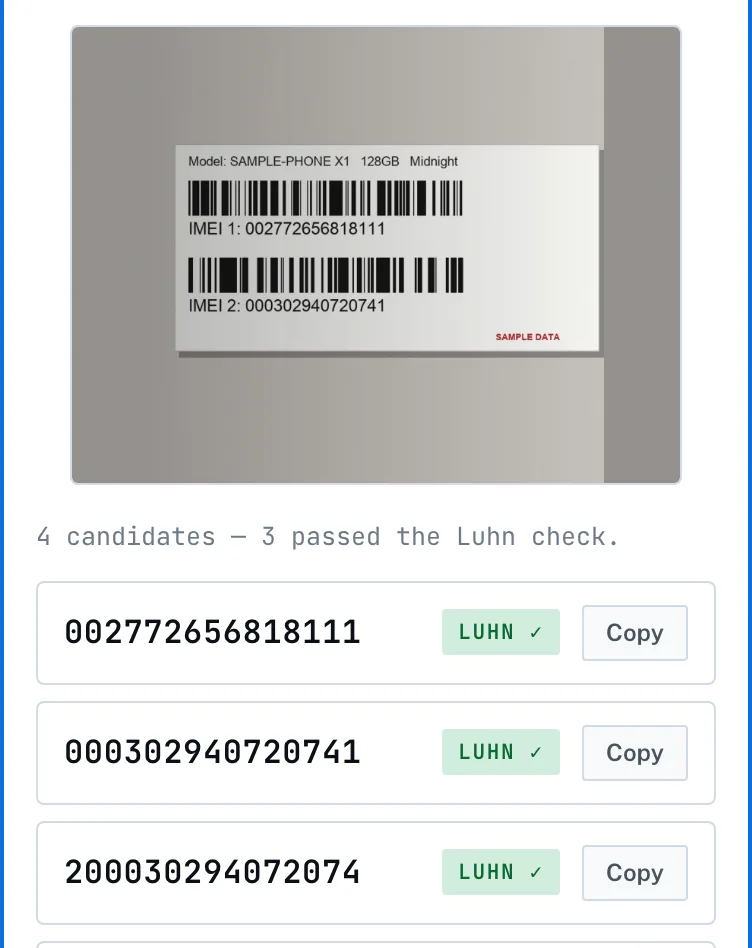
We tested five sample box labels (IMEIs in the 00 test range, made for the test) on 14 October 2026. The app read the digits of all five correctly from one swipe each, but on four of them the stroke also caught part of the IMEI 1: label, so the copied text needed trimming. The browser tool found the IMEI on only one of the five tilted labels and returned nothing on the rest. On the one it read, it also listed a third 15-digit run that straddled both numbers and still passed Luhn, a reminder that one pass in ten is chance.
If you are collecting IMEIs for an asset list rather than one claim, getting numbers from images into a spreadsheet covers the trap where Excel mangles them on arrival. Vehicles have a comparable identifier with its own checksum, described in where to find a VIN and how to read it.
Frequently asked questions
Does *#06# work without a SIM card?
Yes. The code is handled by the phone itself, not the network, so it works with no SIM, no service and no data. It works on feature phones and tablets with cellular too.
Why does my phone show two IMEI numbers?
It supports two SIMs. Each radio identity gets its own IMEI, so a dual-SIM or SIM-plus-eSIM phone reports IMEI1 and IMEI2. For insurance or unlocking, IMEI1 is the one normally asked for.
Try the tool this guide is about
It runs in your browser — nothing uploaded, no account. The app adds the camera, offline use, and a paid scan history.
Related guides
How to Read a VIN Number and Where to Find It
How to read a VIN number position by position, why I, O and Q never appear, what the 9th and 10th characters mean, and the six places a VIN is stamped on a car.
OCR Accuracy: Why Numbers Come Out Wrong
OCR accuracy is quoted per character, which hides the real problem. On a long number the whole string is what matters, and that falls away fast. Here is the maths.
Image to Excel: the Traps in Data From Picture
Image to Excel works well until a long number appears. Excel's Data from Picture, the 15-digit ceiling, lost leading zeros, and how to avoid each of them.