How to Copy Text From a Screenshot
By Ilya Makarov · Updated 2026-10-14
Every major platform now does this for free, with software you already have. Before you look for a tool, check the one in your hand — for ordinary paragraphs of text it will almost certainly do the job.
| Platform | What to use | How |
|---|---|---|
| iPhone, iPad | Live Text | Open the screenshot in Photos, tap the text-selection icon at the bottom right, select as normal |
| Android | Google Lens | Open in Google Photos, tap the Lens button, then Copy text. Circle to Search does the same from any screen |
| Windows 11 | Snipping Tool | Open the capture, click Text Actions, then Copy All Text |
| Windows 10 or 11 | PowerToys Text Extractor | Win+Shift+T, drag a region, text lands on the clipboard |
| macOS | Live Text | Open in Preview, Quick Look or Photos and drag across the text directly |
| Linux | Tesseract CLI | tesseract shot.png - prints the recognised text to standard output |
Two details worth knowing. Live Text needs an A12 Bionic chip or newer, which means iPhone XS, XR or later — on an iPhone X or 8 the option simply is not there, and no setting will produce it. And the Snipping Tool’s Text Actions arrived in version 11.2308.33.0; recognition runs locally on your machine rather than in the cloud, which matters if the screenshot contains anything internal.
The trick that avoids OCR entirely
On an iPhone, if the screenshot is of a web page in Safari, do not recognise it at all. Take the screenshot, tap the thumbnail, and switch from Screen to Full Page at the top. Tap Done and save to Files, and you get a PDF of the entire page with a real text layer — selectable, searchable, exact. No recognition step means no recognition errors.
The same principle applies everywhere. If the text exists somewhere as text, getting to that copy always beats reading pixels. Print to PDF, Reader mode, or the original document the screenshot was taken from.
Where the built-in tools fall down
They are good. They are not uniformly good, and the failures cluster in predictable places.
Too few pixels. This is the single biggest cause of wrong characters, and it is not a software problem. Recognition engines want roughly twenty pixels of lowercase letter height — the equivalent of 10pt text scanned at 300 dpi. Below about ten pixels, accuracy falls apart; below eight, small text is treated as noise and discarded outright. A screenshot of a phone, viewed on a laptop at half size and then re-captured, can easily land in that range.
The fix is upstream. Zoom in before you take the screenshot, so the characters are physically larger in the captured pixels. Enlarging afterwards adds no information.
Long random strings. Recognisers use language context to resolve ambiguous shapes, and a licence key, wallet address or verification code gives them none. Every character stands alone, so 0 against O and 1 against l become coin flips. This is also why phone numbers misread more often than the words around them — pulling phone numbers out of an image covers the structural checks that catch it.
Low contrast. Dark-mode interfaces, game HUDs, semi-transparent overlays, grey placeholder text. Contrast is what separates a glyph from its background, and thin contrast plus small type is the worst combination there is.
Compressed video frames. A screenshot of a paused video carries the codec’s blocking artifacts, which smear character edges in exactly the way recognition is most sensitive to.
Multi-column layouts. A screenshot of a PDF with two columns often comes back interleaved — line one of column one, then line one of column two. The characters are right and the text is unusable.
The proofreading gap
There is a design problem shared by all the built-in tools: they put the result straight on your clipboard. You paste it, it looks right, and you discover the error three steps later when the code is rejected or the reference does not match.
For prose that hardly matters — you would notice a wrong word. For anything you cannot verify by reading, it matters a lot. Our screenshot to text tool shows the recognised text next to the image before anything reaches the clipboard, so the comparison happens before the copy rather than after the paste. You cannot edit it in place; if one character is wrong, copy it and fix that character after pasting — at least you know which one.
Our own test shows why. On 14 October 2026 the app read two sample promo codes. One came back right. The other, SAMPLE25 in a typewriter face, came back as SAMPILE25 and went to the clipboard looking just as confident.
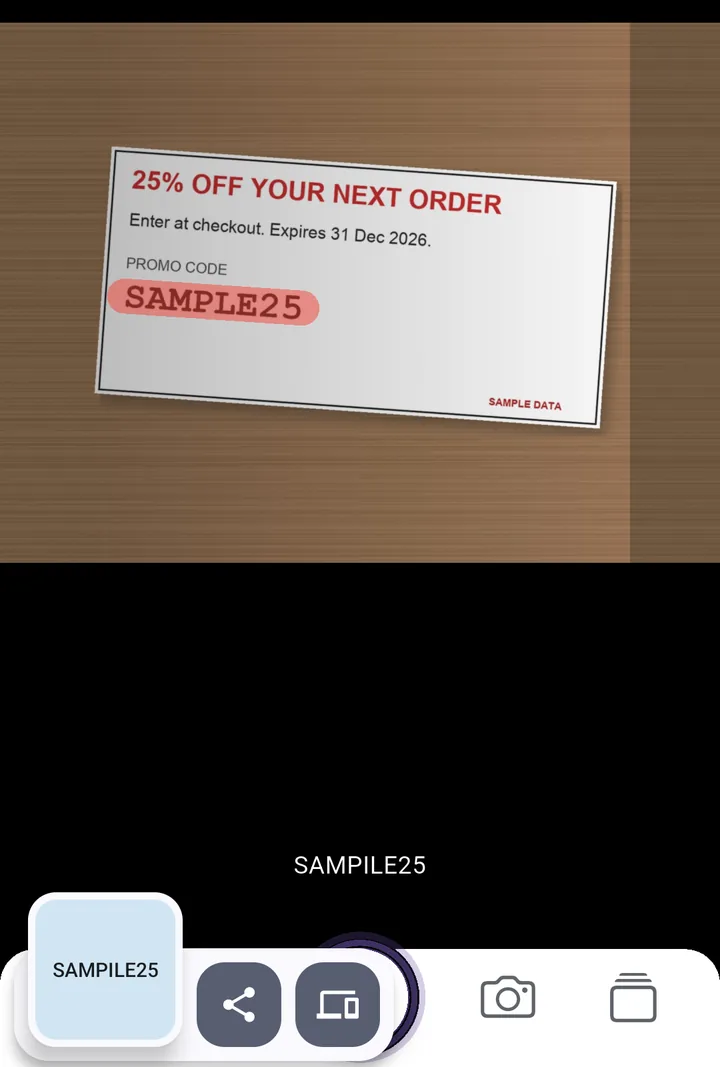
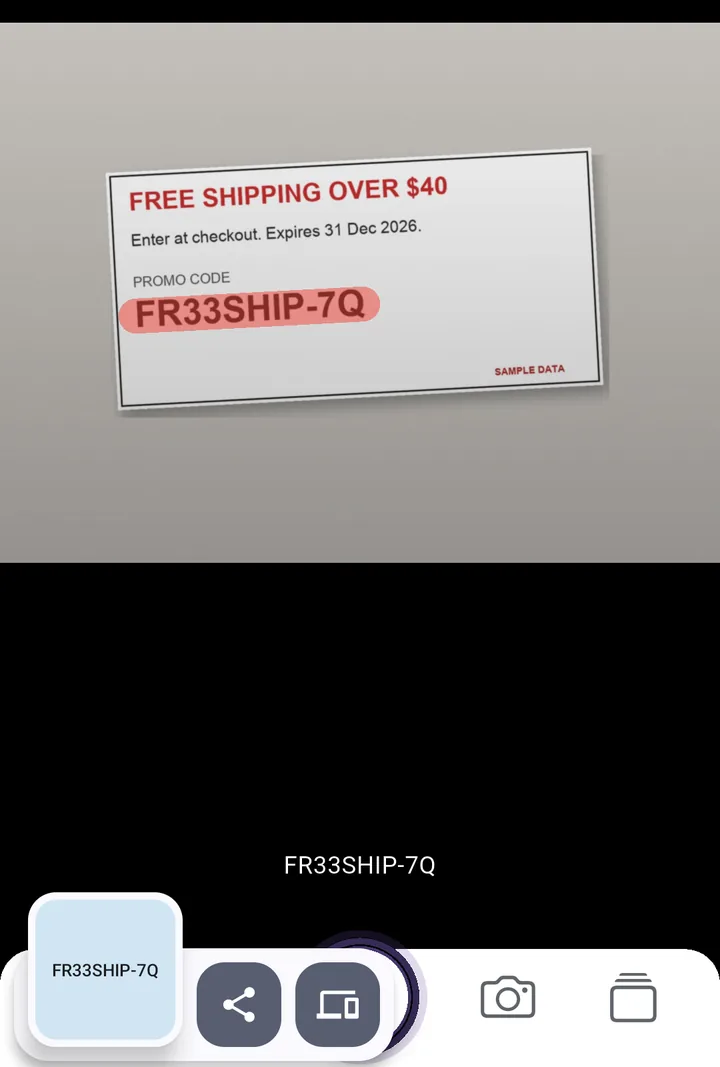
That single change is most of the value. The recognition in a modern browser is not dramatically better or worse than the recognition on your phone; what differs is whether you get a chance to look at it. For long codes, references and anything numeric, the screenshot to text tool is worth the extra click for that reason alone.
Getting a better capture
Crop to just the text before recognising — surrounding interface chrome, icons and buttons all give the engine things to misinterpret. Capture at native resolution rather than screenshotting a scaled window. Straighten anything skewed. And if the source is a scrolling page, capture it in overlapping sections rather than as one zoomed-out image, because pixel height per character beats completeness every time.
Frequently asked questions
Which iPhones can copy text from a screenshot?
Any iPhone with an A12 Bionic chip or newer, running iOS 15 or later. That means iPhone XS, XS Max, XR and everything after. Live Text is not available on iPhone X, 8 or older.
Why does the copied text come out with wrong characters?
Almost always too few pixels per character. Recognition needs roughly twenty pixels of letter height to be reliable, and it collapses below about ten. Crop and enlarge before recognising, not after.
Try the tool this guide is about
It runs in your browser — nothing uploaded, no account. The app adds the camera, offline use, and a paid scan history.
Related guides
Extract Phone Numbers From an Image or Photo
Extract phone numbers from an image: the free tools that already do it, the numbering rules that catch misreads, and how to clean the list before you dial.
OCR Accuracy: Why Numbers Come Out Wrong
OCR accuracy is quoted per character, which hides the real problem. On a long number the whole string is what matters, and that falls away fast. Here is the maths.
Image to Excel: the Traps in Data From Picture
Image to Excel works well until a long number appears. Excel's Data from Picture, the 15-digit ceiling, lost leading zeros, and how to avoid each of them.